Completed Task Location
Ideally, users complete tasks at the client's location, so it is important to verify that tasks were actually completed in the right place.
To view the location of tasks, select the Tasks button at the top of the Location screen.
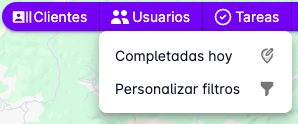
Two options will appear:
- Completed today: only tasks completed on the current day will be shown.
- Custom filter: a form will open to filter tasks by date and user.
Only tasks with a Completed status are shown, as these are the ones with a recorded geographic location.
Tasks will appear on the map with a marker showing the task's location.
Clicking on a marker will display more information about the task.
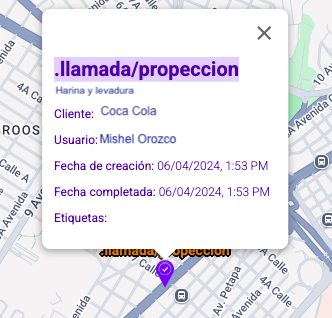
Clicking on the task title will open another page showing the full task detail.
If the task has a linked client, you can click the client's name to open the full client detail in another page.
Since you can also view user tracks, you may want to see the tasks alongside the track on the same screen. Once you have the tasks on the map, use the Filter tracks feature to overlay the route taken by the user who completed those tasks.