API
OptaCheck provides a REST API to interact with the OptaCheck Workspace. This API allows developers to build custom applications, integrations, and automations that interact with Workspace data. To use the API, basic programming knowledge and familiarity with RESTful APIs are required.
The base URL of the API is:
The API version and Workspace ID must then be appended:
https://api.optacheck.com/v1.0/workspaces/<workspace-id>/
Currently, the API supports the following operations: - Authentication: Allows users to authenticate and obtain an access token. - Tasks: Allows creating, reading, updating, and deleting tasks. - Clients: Allows creating, reading, updating, and deleting clients.
Prerequisites
To use the API, the Workspace must have API access enabled. Contact OptaCheck support to enable API access for your Workspace. You also need to know the Workspace ID — contact OptaCheck support to obtain this.
Workspace Authentication
Authentication is performed using an access token that must be sent with every API request. This token is also known as the API Key. To obtain the API Key, contact OptaCheck support.
User Authentication
User authentication is performed using an access token that must be sent with every API request. To obtain the user access token, make a request to the authentication API with the user's credentials.
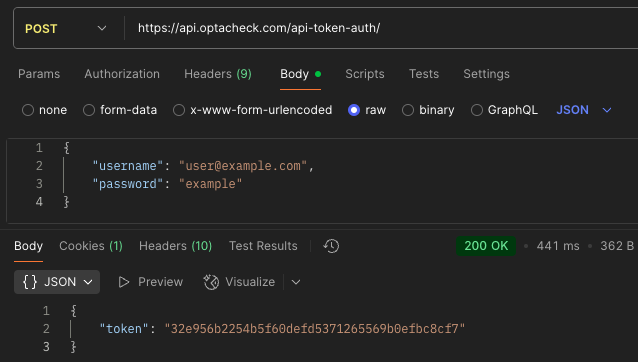
The authentication API is at: https://api.optacheck.com/api-token-auth/
Send the user's credentials in the request body as JSON:
{
  "username": "<your-registered-email>",
  "password": "<your-password>"
}
If the credentials are correct, the API will return an access token to use in each request.
{
  "token": "<your-access-token>"
}
Using the API
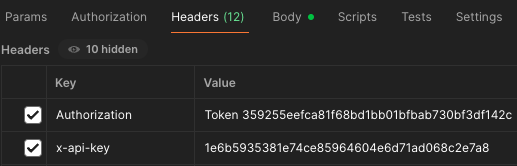
To use the API, send HTTP requests to the corresponding URLs. Each request must include the user's access token in the request header. The header must have the following format:
Authorization: Token <your-access-token>
x-api-key: <workspace-api-key>
Content-Type: application/json
Example (with fictitious data) of how the headers of an API request look:
Available Operations
Tasks
Tasks are one of the main entities in the OptaCheck Workspace. You can create, read, update, and delete tasks through the API.
The main fields a task has are: - status: Task status. - title: Task title. Maximum 100 characters. - description (optional): A task description. Maximum 255 characters. - forms (optional): List of form IDs the task will use. - project (optional): A project ID. - client (optional): A client ID. - user_email: Email of the user to assign the task to. - data (optional): Information for the questions that appear in the task.
Read a Task
To read a task, send a GET request to the following URL:
GET https://api.optacheck.com/v1.0/workspaces/<workspace-id>/assignments/<task-id>/
HTTP Request Example:
GET /v1.0/workspaces/<workspace-id>/assignments/<task-id>/ HTTP/1.1
Host: api.optacheck.com
Authorization: Token <your-access-token>
x-api-key: <workspace-api-key>
CURL Example:
curl -X GET \
https://api.optacheck.com/v1.0/workspaces/<workspace-id>/assignments/<task-id>/ \
-H 'Authorization: Token <your-access-token>' \
-H 'x-api-key: <workspace-api-key>'
The response will be a JSON object containing the data of the requested task.
{
    "id": "<task-id>",
    "status": "assigned",
    "title": "<task-title>",
    "description": "<task-description>",
    "forms": ["<form-id>", "form-id-2", "<form-id-3>"],
    "project": "<project-id>",
    "client": "<client-id>",
    "user": "<assigned-user-id>",
    "by_user": "<user-id-who-created-task>",
    "date_edited": "2025-06-20T00:21:19.126137Z",
    "date_created": "2025-06-20T00:21:19.126147Z",
    "data": {
      "fields": [
        {
          "id": "<field-id>",
          "value": "<field-value>",
          "title": "<field-label>"
        },
        {
          "id": "<field-id-2>",
          "value": "<field-value-2>",
          "title": "<field-label-2>"
        }
      ]
    },
    "status_history": [
        {
            "status": "assigned",
            "date_status": "2025-06-20T00:21:19.213486Z",
            "status_name": "Assigned"
        }
    ]
}
The data field includes additional fields beyond form fields; it can be left empty if no additional fields are needed in the task.
Create a Task
To create a task, send a POST request to the following URL:
POST https://api.optacheck.com/v1.0/workspaces/<workspace-id>/assignments/
This request must include the user's access token and the Workspace API Key in the headers. The URL must include the Workspace ID, and the request body must contain the task data as JSON.
HTTP Request Example:
POST /v1.0/workspaces/<workspace-id>/assignments/ HTTP/1.1
Host: api.optacheck.com
Authorization: Token <your-access-token>
x-api-key: <workspace-api-key>
Content-Type: application/json

{
    "status": "assigned",
    "title": "<task-title>",
    "description": "<task-description>",
    "forms": ["<form-id>", "form-id-2", "<form-id-3>"],
    "project": "project-id",
    "client": "client-id",
    "user_email": "<assigned-user-email>"
}
CURL Example:
curl -X POST \
https://api.optacheck.com/v1.0/workspaces/<workspace-id>/assignments/ \
-H 'Authorization: Token <your-access-token>' \
-H 'x-api-key: <workspace-api-key>' \
-H 'Content-Type: application/json' \
-d '{
    "status": "assigned",
    "title": "<task-title>",
    "description": "<task-description>",
    "forms": ["<form-id>", "form-id-2", "<form-id-3>"],
    "project": "project-id",
    "client": "client-id",
    "user_email": "<assigned-user-email>"
}'
The response will be a JSON object containing the created task data, including its ID and other details. The response will have HTTP status 201 Created.
{
    "id": "<task-id>",
    "status": "assigned",
    "title": "<task-title>",
    "description": "<task-description>",
    "forms": ["<form-id>", "form-id-2", "<form-id-3>"],
    "project": "<project-id>",
    "client": "<client-id>",
    "user": "<assigned-user-id>",
    "by_user": "<user-id-who-created-task>",
    "date_edited": "2025-06-20T00:21:19.126137Z",
    "date_created": "2025-06-20T00:21:19.126147Z",
    "status_history": [
        {
            "status": "assigned",
            "date_status": "2025-06-20T00:21:19.213486Z",
            "status_name": "Assigned"
        }
    ]
}
Update a Task
To update a task, send a PUT request to the following URL:
PUT https://api.optacheck.com/v1.0/workspaces/<workspace-id>/assignments/<task-id>/
This request must include the user's access token and the Workspace API Key in the headers. The request body must contain the updated task data as JSON.
HTTP Request Example:
PUT /v1.0/workspaces/<workspace-id>/assignments/<task-id>/ HTTP/1.1
Host: api.optacheck.com
Authorization: Token <your-access-token>
x-api-key: <workspace-api-key>
Content-Type: application/json

{
    "status": "in_progress",
    "title": "<new-task-title>",
    "description": "<new-task-description>",
    "forms": ["<updated-form-id>", "form-id-2", "<form-id-3>"],
    "project": "<updated-project-id>",
    "client": "<updated-client-id>",
    "user_email": "<assigned-user-email>"
}
CURL Example:
curl -X PUT \
https://api.optacheck.com/v1.0/workspaces/<workspace-id>/assignments/<task-id>/ \
-H 'Authorization: Token <your-access-token>' \
-H 'x-api-key: <workspace-api-key>' \
-H 'Content-Type: application/json' \
-d '{
  "status": "active"
}'
The response will be a JSON object containing the updated task data and with HTTP status 200 OK.
{
    "id": "<task-id>",
    "status": "active",
    "title": "<new-task-title>",
    "description": "<new-task-description>",
    "forms": ["<updated-form-id>", "form-id-2", "<form-id-3>"],
    "project": "<updated-project-id>",
    "client": "<updated-client-id>",
    "user": "<assigned-user-id>",
    "by_user": "<user-id-who-created-task>",
    "date_edited": "2025-06-20T00:21:19.126137Z",
    "date_created": "2025-06-20T00:21:19.126147Z",
    "status_history": [
        {
            "status": "assigned",
            "date_status": "2025-06-20T00:21:19.213486Z",
            "status_name": "Assigned"
        },
        {
            "status": "in_progress",
            "date_status": "2025-06-20T00:22:19.213486Z",
            "status_name": "In progress"
        }
    ]
}
Delete a Task
To delete a task, send a DELETE request to the following URL:
DELETE https://api.optacheck.com/v1.0/workspaces/<workspace-id>/assignments/<task-id>/
This request must include the user's access token and the Workspace API Key in the headers.
HTTP Request Example:
DELETE /v1.0/workspaces/<workspace-id>/assignments/<task-id>/ HTTP/1.1
Host: api.optacheck.com
Authorization: Token <your-access-token>
x-api-key: <workspace-api-key>
CURL Example:
curl -X DELETE \
https://api.optacheck.com/v1.0/workspaces/<workspace-id>/assignments/<task-id>/ \
-H 'Authorization: Token <your-access-token>' \
-H 'x-api-key: <workspace-api-key>'
Clients
Clients are one of the main entities in the OptaCheck Workspace. You can create, read, update, and delete clients through the API.
The main fields a client has are: - name: Client name. - description (optional): Client description. - internal_code (optional): Client internal code. - address (optional): Client address. - sales_goal (optional): Client sales goal. - contact_name (optional): Contact person's name. - contact_phone (optional): Contact person's phone number. - contact_email (optional): Contact person's email address. - latitude (optional): Latitude of the client's location. - longitude (optional): Longitude of the client's location. - invoice_tax_identifier (optional): Tax identifier used for invoicing. - invoice_name (optional): Name used for invoicing. - projects (optional): List of project IDs associated with the client. - teams (optional): List of team IDs associated with the client. - seller_email: Email address of the seller assigned to the client.
Read a Client
To read a client, send a GET request to the following URL:
GET https://api.optacheck.com/v1.0/workspaces/<workspace-id>/clients/<client-id>/
HTTP Request Example:
GET /v1.0/workspaces/<workspace-id>/clients/<client-id>/ HTTP/1.1
Host: api.optacheck.com
Authorization: Token <your-access-token>
x-api-key: <workspace-api-key>
CURL Example:
curl -X GET \
https://api.optacheck.com/v1.0/workspaces/<workspace-id>/clients/<client-id>/ \
-H 'Authorization: Token <your-access-token>' \
-H 'x-api-key: <workspace-api-key>'
The response will be a JSON object containing the requested client data.
{
    "id": "<client-id>",
    "name": "<client-name>",
    "description": "<client-description>",
    "internal_code": "<client-internal-code>",
    "address": "<client-address>",
    "sales_goal": "<sales-goal>",
    "contact_name": "<contact-name>",
    "contact_phone": "<contact-phone>",
    "contact_email": "<contact-email>",
    "latitude": "<client-latitude>",
    "longitude": "<client-longitude>",
    "invoice_tax_identifier": "<tax-identifier>",
    "invoice_name": "<invoice-name>",
    "projects": ["<project-id-1>", "<project-id-2>"],
    "teams": ["<team-id-1>", "<team-id-2>"],
    "seller_email": "<seller-email>"
}
Create a Client
To create a client, send a POST request to the following URL:
POST https://api.optacheck.com/v1.0/workspaces/<workspace-id>/clients/
This request must include the user's access token and the Workspace API Key in the headers. The URL must include the Workspace ID, and the request body must contain the client data as JSON.
HTTP Request Example:
POST /v1.0/workspaces/<workspace-id>/clients/ HTTP/1.1
Host: api.optacheck.com
Authorization: Token <your-access-token>
x-api-key: <workspace-api-key>
Content-Type: application/json

{
    "name": "<client-name>",
    "description": "<client-description>",
    "internal_code": "<client-internal-code>",
    "address": "<client-address>",
    "sales_goal": "<sales-goal>",
    "contact_name": "<contact-name>",
    "contact_phone": "<contact-phone>",
    "contact_email": "<contact-email>",
    "latitude": "<client-latitude>",
    "longitude": "<client-longitude>",
    "invoice_tax_identifier": "<tax-identifier>",
    "invoice_name": "<invoice-name>",
    "projects": ["<project-id-1>", "<project-id-2>"],
    "teams": ["<team-id-1>", "<team-id-2>"],
    "seller_email": "<seller-email>"
}
CURL Example:
curl -X POST \
https://api.optacheck.com/v1.0/workspaces/<workspace-id>/clients/ \
-H 'Authorization: Token <your-access-token>' \
-H 'x-api-key: <workspace-api-key>' \
-H 'Content-Type: application/json' \
-d '{
    "name": "<client-name>",
    "description": "<client-description>",
    "internal_code": "<client-internal-code>",
    "address": "<client-address>",
    "sales_goal": "<sales-goal>",
    "contact_name": "<contact-name>",
    "contact_phone": "<contact-phone>",
    "contact_email": "<contact-email>",
    "latitude": "<client-latitude>",
    "longitude": "<client-longitude>",
    "invoice_tax_identifier": "<tax-identifier>",
    "invoice_name": "<invoice-name>",
    "projects": ["<project-id-1>", "<project-id-2>"],
    "teams": ["<team-id-1>", "<team-id-2>"],
    "seller_email": "<seller-email>"
}'
The response will be a JSON object containing the created client data, including its ID and other details. The response will have HTTP status 201 Created.
{
    "id": "<client-id>",
    "name": "<client-name>",
    "description": "<client-description>",
    "internal_code": "<client-internal-code>",
    "address": "<client-address>",
    "sales_goal": "<sales-goal>",
    "contact_name": "<contact-name>",
    "contact_phone": "<contact-phone>",
    "contact_email": "<contact-email>",
    "latitude": "<client-latitude>",
    "longitude": "<client-longitude>",
    "invoice_tax_identifier": "<tax-identifier>",
    "invoice_name": "<invoice-name>",
    "projects": ["<project-id-1>", "<project-id-2>"],
    "teams": ["<team-id-1>", "<team-id-2>"],
    "seller_email": "<seller-email>"
}
Update a Client
To update a client, send a PUT request to the following URL:
PUT https://api.optacheck.com/v1.0/workspaces/<workspace-id>/clients/<client-id>/
This request must include the user's access token and the Workspace API Key in the headers. The request body must contain the updated client data as JSON.
HTTP Request Example:
PUT /v1.0/workspaces/<workspace-id>/clients/<client-id>/ HTTP/1.1
Host: api.optacheck.com
Authorization: Token <your-access-token>
x-api-key: <workspace-api-key>
Content-Type: application/json

{
    "name": "<new-client-name>",
    "description": "<new-client-description>",
    "internal_code": "<new-internal-code>",
    "address": "<new-address>",
    "sales_goal": "<new-sales-goal>",
    "contact_name": "<new-contact-name>",
    "contact_phone": "<new-contact-phone>",
    "contact_email": "<new-contact-email>",
    "latitude": "<new-client-latitude>",
    "longitude": "<new-client-longitude>",
    "invoice_tax_identifier": "<new-tax-identifier>",
    "invoice_name": "<new-invoice-name>",
    "projects": ["<project-id-1>", "<project-id-2>"],
    "teams": ["<team-id-1>", "<team-id-2>"],
    "seller_email": "<seller-email>"
}
CURL Example:
curl -X PUT \
https://api.optacheck.com/v1.0/workspaces/<workspace-id>/clients/<client-id>/ \
-H 'Authorization: Token <your-access-token>' \
-H 'x-api-key: <workspace-api-key>' \
-H 'Content-Type: application/json' \
-d '{
    "name": "<new-client-name>",
    "description": "<new-client-description>",
    "internal_code": "<new-internal-code>",
    "address": "<new-address>",
    "sales_goal": "<new-sales-goal>",
    "contact_name": "<new-contact-name>",
    "contact_phone": "<new-contact-phone>",
    "contact_email": "<new-contact-email>",
    "latitude": "<new-client-latitude>",
    "longitude": "<new-client-longitude>",
    "invoice_tax_identifier": "<new-tax-identifier>",
    "invoice_name": "<new-invoice-name>",
    "projects": ["<project-id-1>", "<project-id-2>"],
    "teams": ["<team-id-1>", "<team-id-2>"],
    "seller_email": "<seller-email>"
}'
The response will be a JSON object containing the updated client data and will have HTTP status 200 OK.
Delete a Client
To delete a client, send a DELETE request to the following URL:
DELETE https://api.optacheck.com/v1.0/workspaces/<workspace-id>/clients/<client-id>/
This request must include the user's access token and the Workspace API Key in the headers.
HTTP Request Example:
DELETE /v1.0/workspaces/<workspace-id>/clients/<client-id>/ HTTP/1.1
Host: api.optacheck.com
Authorization: Token <your-access-token>
x-api-key: <workspace-api-key>
CURL Example:
curl -X DELETE \
https://api.optacheck.com/v1.0/workspaces/<workspace-id>/clients/<client-id>/ \
-H 'Authorization: Token <your-access-token>' \
-H 'x-api-key: <workspace-api-key>'